Archify
🗒️ tt-a1i/archify — an agent skill that turns a plain-English description of a system or process (or a whole repository) into a polished, interactive, verifiable self-contained HTML system map you can open, present, theme-toggle, copy, and export at up to 4× resolution. Works in Claude Code, Cursor, Codex CLI, and opencode. MIT-licensed. Not a drawing editor and not a Mermaid theme — its job is turning technical intent into a communication artifact you can trust: every interaction (search, reach tracing, route probing, guided stories) reuses authored topology instead of inventing it.
Links
Description
🧩 What it does:
- Describe, don’t draw — English in, polished technical diagram out; no design skills needed.
- Five diagram types — architecture, workflow, sequence, data-flow, lifecycle (see table below).
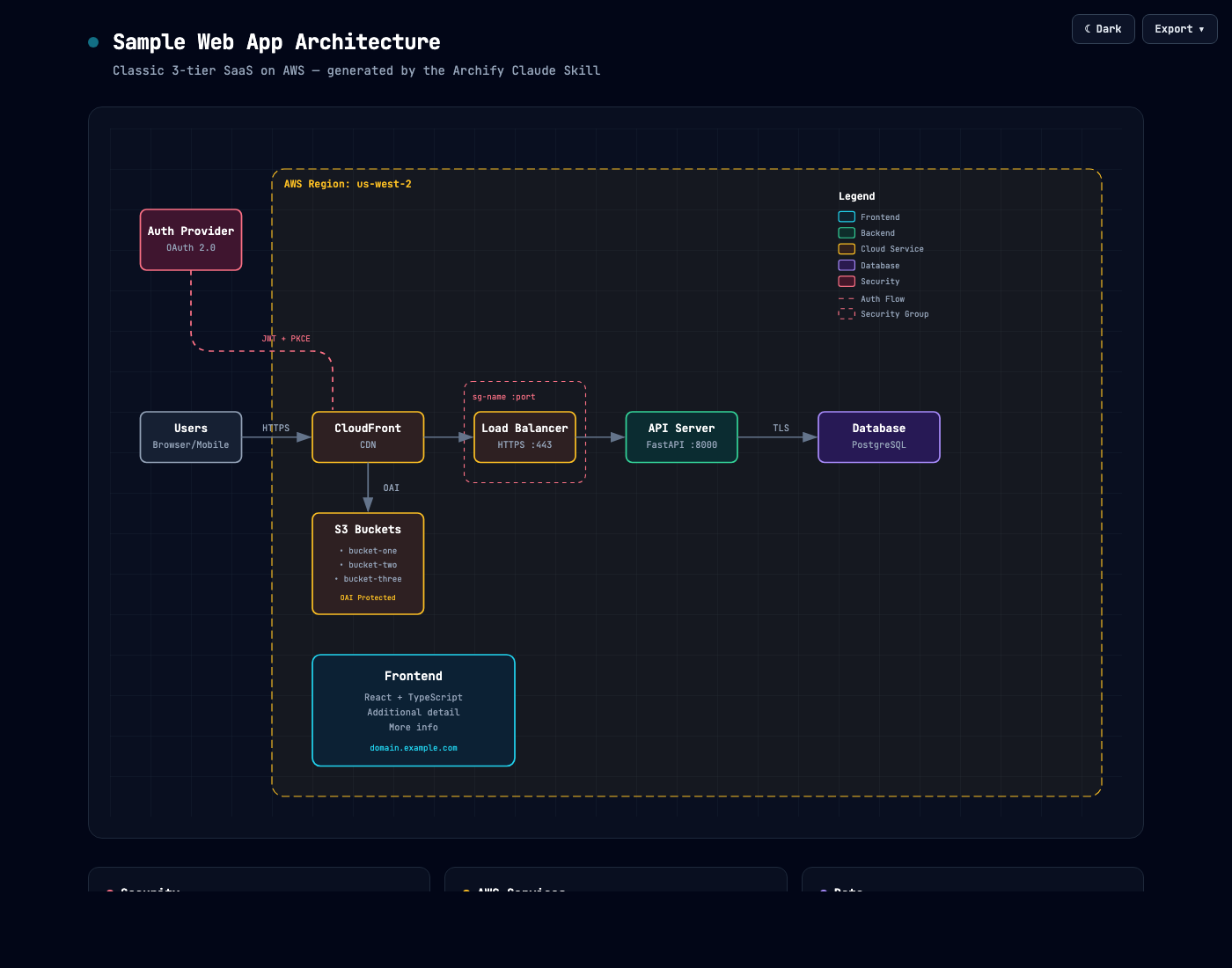
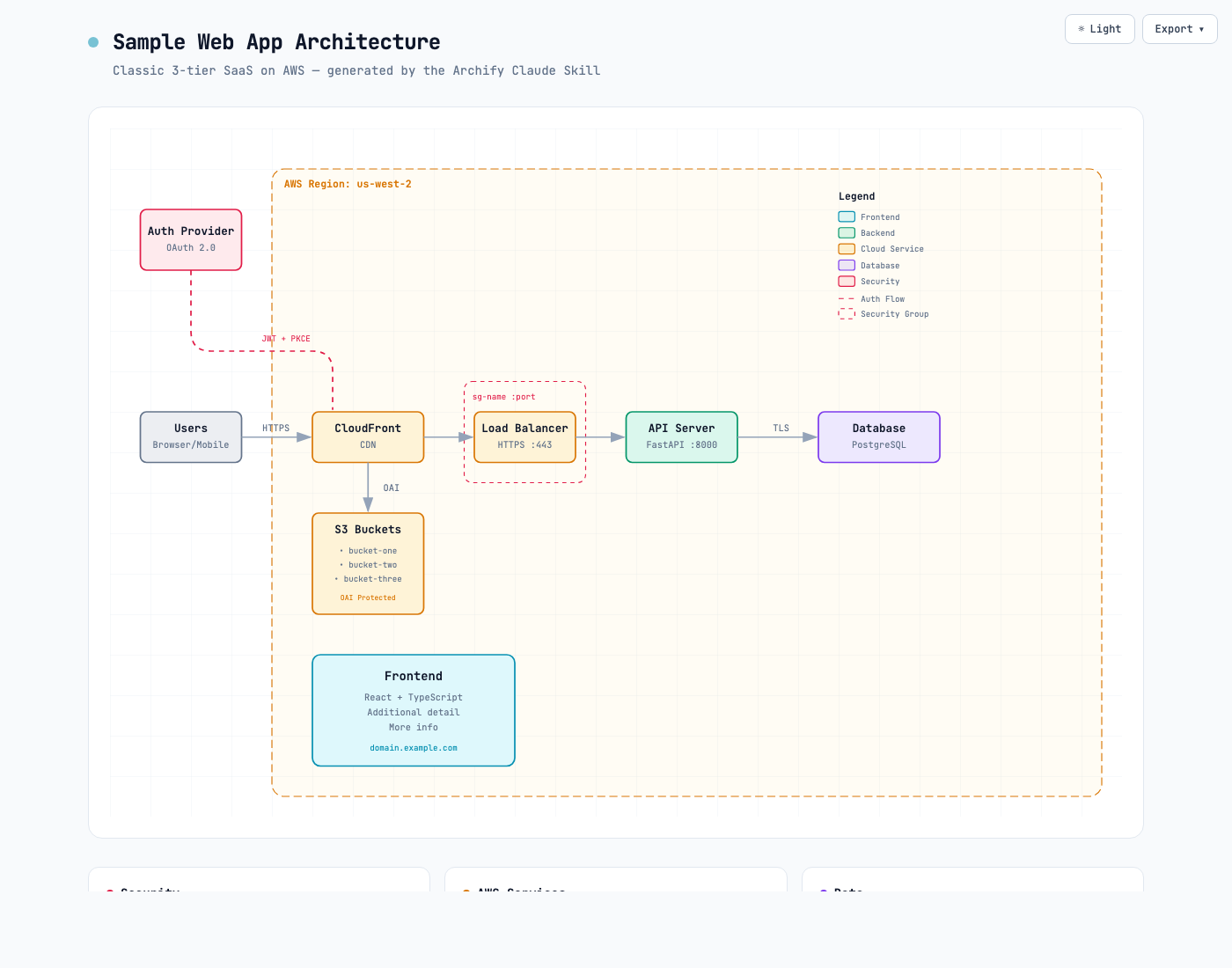
- Built-in dark/light toggle — one click (shortcut
T), persists across sessions. - Copy PNG to clipboard — paste straight into Slack / Notion / GitHub (shortcut
Efor the export menu). - Ultra-crisp export — PNG / JPEG / WebP rendered natively at up to 4× source resolution (no upsampling blur), or SVG for true vector.
- Theme-following SVG — exported SVGs ship both variable sets +
@media (prefers-color-scheme), so one SVG in a GitHub README follows the reader’s system theme (no more two PNGs in a<picture>). - Semantic tech labels — call a node
aws.lambda,postgres,redis,github-actions,openai; Archify maps it to the right visual category without a full icon library. - Self-contained HTML — zero dependencies; share by sending the file.
- Iterate by chat — “add Redis”, “move auth to the left”, “highlight the rollback path” while the source JSON stays in session.
- Grounded interaction (2.12) — semantic search (
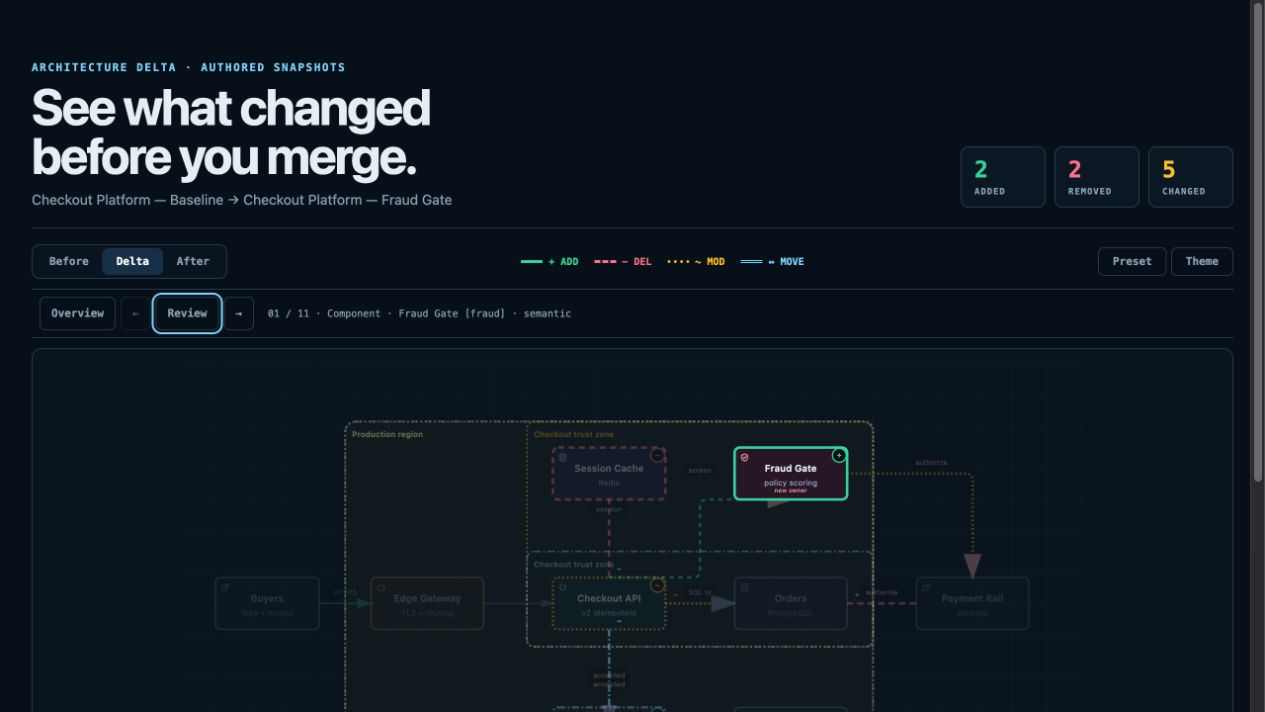
/), upstream/downstream reach tracing, directed route probe (R), role comparison lens (L), overview radar (M), guided stories (P), Presentation Stage (F); deep links restore exact state (#focus=,#route=a~b,#lens=,#view=). - Architecture Delta review — compare two validated snapshots as Before / Delta / After with exact added/removed/changed/moved/rerouted facts and a machine receipt:
node archify/bin/archify.mjs compare architecture base.json head.json delta.html --json. Viewer-only — no impact/risk/merge-safety inference. - Share cards & WebM — canonical 1200×630 diagram, route, and reach share cards for READMEs/socials; browser-native WebM recording.
- Evidence-backed nodes (opt-in) — Architecture nodes marked
SRC nopen Git-verified files and line ranges pinned to one public commit; ordinary artifacts stay source-free. - Visual presets —
classic(default),signal-flow,blueprint; the 2.17 README counts four presets without naming the new one, and adds built-in brand marks. Motion is explicit ("animation": "trace"), finite, respectsprefers-reduced-motion, never enters canonical exports. - deployment-ownership profile (opt-in) — for production deployment reviews, fails closed when owners, single-region placement, private DB scope, or named boundary crossings are missing; validates authored facts, not live infra.
Download or use
npx skills add tt-a1i/archify -g
Installs across supported agents through the open-source skills CLI (vercel-labs/skills). Try without a permanent install:
npx skills use tt-a1i/archify@archify --agent codex # or claude-code / opencode
Then: Use archify to map this repository's runtime architecture. Manual install = unzip archify.zip into the agent’s skills dir (~/.claude/skills/, ~/.agents/skills/, ~/.config/opencode/skills/); no npm install needed.
Reasoning for
Fills the diagram / design blind spot of a coding agent (cf. Extending Claude Code — Tools for Its Blind Spots): instead of hand-editing SVG or fighting generic auto-layout, the agent emits a typed JSON IR and a renderer produces a clean, portable artifact. Use it to:
- Turn a repo analysis into a high-level runtime architecture (8–12 core components, one primary path, external deps, trust boundaries — detail in cards, not more edges).
- Draw a CI/CD workflow with a clear happy path and restrained failure/rollback branches.
- Document a data-flow / lineage view with an explicit PII boundary.
- Ship a theme-aware SVG into a README so it follows the reader’s light/dark preference.
Diagram types
| Type | Best for | Prompt with |
|---|---|---|
| Architecture | Components, services, storage, boundaries | Scope, core components, primary path |
| Workflow | CI/CD, approvals, tool calls, runbooks | Participants, order, branches, exceptions |
| Sequence | API calls, cache fallback, auth, async traces | Callers, callees, returns, timing |
| Data Flow | Pipelines, lineage, PII, downstream consumers | Sources, transforms, stores, boundaries |
| Lifecycle | State machines, retries, waits, terminal states | States, events, retry/cancel paths |
How it works
Renderer-backed diagrams run a small, inspectable loop — the same one the packaged zero-dependency CLI exposes (node bin/archify.mjs guide|validate|preview|deliver|compare|doctor|demo):
| Step | What happens |
|---|---|
| Generate JSON IR | Agent writes a typed description instead of hand-editing final SVG. |
| Validate | Schema, layout, HTML/SVG, route, and label-clearance checks must all pass; failures come as machine-readable JSON with stable rule codes, the exact subject, measured evidence, and only supported repair controls — a repair receipt, not a stack trace. |
| Preview (optional) | Loopback-only (127.0.0.1) desktop loop watches one JSON file, reloads only verified revisions, keeps the last-good diagram visible through failed saves. |
| Deliver | A same-directory candidate is rendered and checked; only a passing artifact atomically replaces the target (deliver --open for one-shot local handoff). |
| Iterate | Targeted JSON edits applied while unrelated structure stays stable; the Skill caps repair at two focused correction rounds. |
Not sure which diagram type fits? node bin/archify.mjs guide "Show an API request with Redis cache miss" recommends one. Archify ships typed JSON IR across all five modes, a real-repository proof case (mco-org/mco traced at pinned commit 9f1a1cf), an 11-scenario Proof Lab with validation receipts, and explicit standard / showcase quality profiles.
meta.locale=en|zh-CN localizes the page title, Legend, states/errors, a11y and the HTML/SVG lang — never authored content.
Preview
Signal Flow · Blueprint · Classic — real generated artifacts, not mockups:
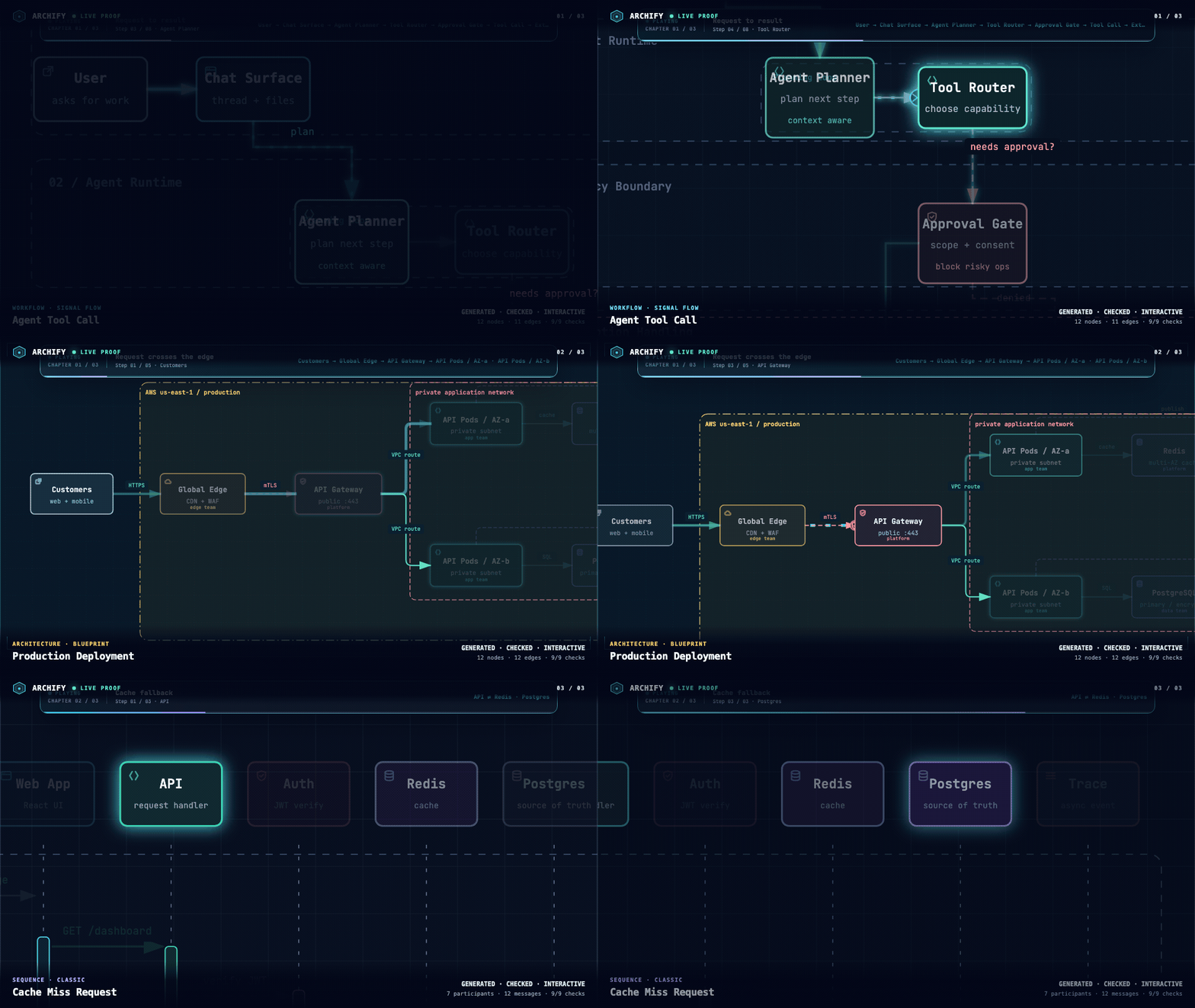
Same diagram, two themes, one click to switch:
| Dark | Light |
|---|---|
 |  |
Architecture Delta compares two validated snapshots for design/PR review:
Installation surfaces
2.17 widened where the skill can live. npx skills add tt-a1i/archify -g covers the agent switcher targets — cursor, codex, claude-code, opencode — and there’s an explicit non-interactive form for Cursor:
npx -y skills add tt-a1i/archify --skill archify --agent cursor --global --copy --yes
| Surface | Install | Capability |
|---|---|---|
| Claude Code | ~/.claude/skills/ or .claude/skills/ | Full renderer + validation |
| Codex CLI | ~/.agents/skills/ or .agents/skills/ | Full renderer + validation |
| opencode | ~/.config/opencode/skills/, .opencode/skills/, .agents/skills/ | Full renderer + validation |
| Raven (EverMind) | Manual ZIP into ~/.raven/workspace/skills | Full renderer + validation; not a switcher target |
| DeepSeek Harness | dsh plugin --profile web add @tt-a1i/archify-dsh@0.1.0 | Community integration for developer-preview @deepseek-ai/dsh@0.1.0-rc.6, Node ^22.19.0 || >=24.0.0. Not an official DeepSeek product, no telemetry |
| Claude.ai | Upload archify.zip under Settings → Capabilities → Skills | Depends on Node.js access in the sandbox |
☘️ Update check, and how to turn it off. Archify may GET a fixed stable manifest purely to show an optional update reminder — it never downloads or installs anything. The server sees normal HTTP metadata (IP, time) and no version, agent, project data, prompts, account/device ID or ETag. Successful checks wait ~72h (±20%); failures retry after 6h then 24h. Set ARCHIFY_UPDATE_CHECK_DISABLED=1 to disable the networking and the reminder-state writes entirely.
Alternatives considered
- Mermaid — text-to-diagram, but generic auto-layout and limited emphasis control; Archify explicitly is not a Mermaid theme and chooses hierarchy/spacing/routes for the story.
- Excalidraw — great for hand-drawn manual diagramming, but you draw it yourself; Archify generates from a description.
- Generic auto-layout / WYSIWYG editors — Archify’s roadmap deliberately excludes Mermaid parsing, generic auto-layout, hosted sharing, and a WYSIWYG editor.
Archify is a fork/rewrite of Cocoon-AI/architecture-diagram-generator v1.0; the original visual language is credited there. Both MIT.
Resources
- 🔗 Repo: github.com/tt-a1i/archify
- 🔗 Project page: tt-a1i.github.io/archify · Scenario guide · Proof Lab
- 🔗 Schema reference · SKILL.md contract · CHANGELOG · ROADMAP
- 🔗 Skills CLI: github.com/vercel-labs/skills · DSH integration README · Agent cookbook
- 📖 Related: Agent Skills · Awesome Agent Skills · Vercel Skills · DeepSeek Harness · Extending Claude Code — Tools for Its Blind Spots
Template: tool